
Laboratory Schedule for 2007, Biology 164
Note: labs may
be rescheduled to respond to experimental difficulties or opportunities.
Labs will be in Seaver West basement, room 007, from 1:15-5:00 Weds afternoons, and possibly longer at times, with 1-3 hours outside of laboratory periods in some weeks.
The purpose of the laboratory of Bio164 is for the class to study genetic regulation in the eukaryote budding yeast. The class as a group will design experiments, carry them out, generate original data, and make conclusions concerning a specific system they have chosen to investigate genetic regulation in yeast. The yeast genome is completely sequenced and around 6000 genes have been identified. They include a number that appear to be ORFs (Open Reading Frames) but may or may not actually encode anything. All yeast ORFs have an ID number that assigns them to a place on a chromosome and the Watson or Crick strand for the mRNA sense strand. Most also have a gene name that represents what we know of the function of the gene. Much information about each gene is collected and accessible via the Saccharomyces Genome Database at Stanford. The web site, which you will be accessing frequently for this laboratory, is: http://www.yeastgenome.org/
Microarray analysis enables us to examine the expression of all of these ORFs at once, in response to an environmental or mutational change. We can thus get a view of compensatory regulatory changes that is much more comprehensive than is available in most organisms. We can see if entire pathways change, if many genes involved in one organelle are changed, and many other kinds of integrative change patterns are possible to detect. The class will choose a regulatory question to study using this method. We can get background data and access to relevant literature via the Stanford Microarray Database at:
http://genome-www5.stanford.edu/MicroArray/SMD/
The second method we will use is quantitative Reverse Transcription PCR. This method enables one to examine the expression of a single gene in comparison with a standard gene known not to change in expression, in two different RNA samples. The mRNA present is copied into cDNA and a variety of dilutions and replicates enable one to obtain its efficiency of amplification and its amount of amplification compared to our standard gene, TUB1. The real time PCR machine (ABI Prism 7000) will be used with SYBR Green dye and a denaturation analysis following the PCR step for this analysis. The part of the laboratory procedural notes giving procedures for qRT PCR will be handed out later in the semester.
The third method we will employ will be fluorescent microscopy of Green Fluorescent Protein-Labeled Proteins. We will use GFP-Hsp12, a membrane protein that is strongly induced by stress, and GFP-Msn2, a stress-related transcription factor. Msn2 is controlled by phosphorylation, which keeps it in the cytoplasm. We will use these marked proteins to observe effects of whatever stressor is chosen by the class as subject of your investigation in 2008.
The laboratory performance will be graded
by LH based on her observations of your seriousness of purpose and thinking in
lab (mistakes don't affect your grade unless you seem to be making mistakes
because you are not paying close
attention. The grade
will be based upon a laboratory notebook that will be graded twice during the
semester. Use your lab notebook in preparation for and during every
laboratory as a journal of what you will do/are doing. Lab books
should include background material with references for each of the experiments,
including reading and description of both the concepts and the methods used.
They should also reflect everything you have done and when it was done,
and provide enough information to allow someone else to repeat your experiment. You should include the laboratory handouts by pasting them
in if you are using a bound notebook, or by including them as pages if you
are using a loose leaf notebook.
Make sure your lab notes reflect that you have read and assimilated the
laboratory handouts. Also, make sure you have analyzed and commented upon
each result, whether control or experiment in nature.
Jan 23, lab 1. LH discusses with class the possible projects for the year. Next week, students choose to study a particular stress such as UV irradiation, heat shock, or glucose exhaustion in the medium during growth (the whole class will study one of these). We will read and discuss papers on each of these and decide on the topic at the second laboratory session. Today, you will be formed into two or three groups and given background materials to read and prepare for next week's laboratory. Today, we will also read two papers on microarrays handed out in laboratory and discuss microarrays as a technique (what are they? what kinds of questions do they help us to address? what are their limitations or problems?) During lab, you should take some notes on these issues in your laboratory notebook. Action items for between laboratories: Before lab, get instructions for logging into the GCAT assessment site and taking the pre microarray survey there. Between labs, read the papers assigned for your group and plan an experiment to present to the class.
Jan 30, lab 2.
LH and students discuss the potential student selected group
project and choose one of the experiments by a secret ballot vote.
Students take notes on the presentations in
lab notebooks. After the vote, class discusses any changes that might be
considered for the proposed experiment, and plans are made for preparing the
samples needed. Students from the group proposing a different project
receive the background readings for the project that has been selected, and
should take notes on them between labs. LH describes software for
class: MagicTool, BRB ArrayTools, GenePix, and GeneSpring. Then, the class will go to SW014,
Hoopes' research lab, and
be introduced to using the software for microarray analysis.
Action items: Write up tentative hypotheses in lab notebooks
using notes and materials given out.
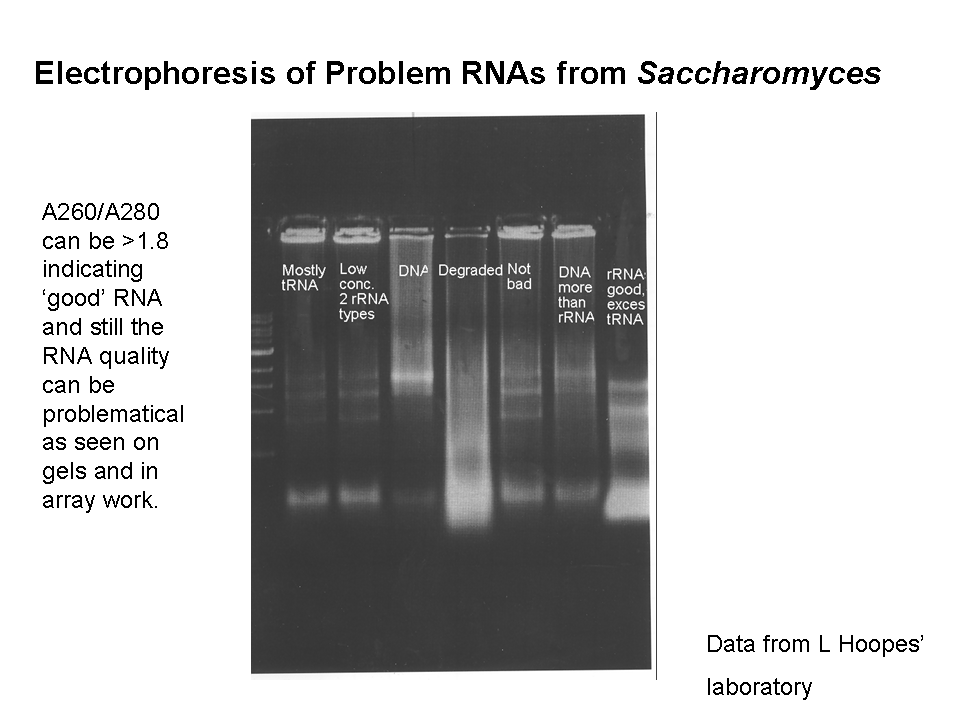
Feb 6, lab 3. LH introduces the day’s experiment briefly. Treatment of cells as planned and isolation of RNA; see lab handout; add handout to notebook. Use RNA paranoia!! Be sure to note any deviation from written procedure in your lab notes. We will begin with total RNA rather than mRNA in our experiment, so we will not isolate polyA+ RNA. Action items: examine the handout on RNA quality assessment in gels and be ready to interpret your results next week. Read over the RNAa procedure since you may do step 1 next week in laboratory. Take notes into your lab notebook from SGD web site on two specific genes you predict might change in our expression in our experiments.
Feb 13, lab 4.
LH
calls on two students to review the purpose of the experiment and what was done
last week. This week's lab: quality control tests on the
RNA prepared and if high quality, first strand and second strand cDNA synthesis.
LH describes the procedures to be used briefly.
Students will
dilute a tiny sample of their RNA for absorbance testing and will also apply another tiny sample of it
to an agarose gel for quality control. While the gel is running,
students will practice
filtering and clustering data using GeneSpring and the
cell cycle data set.
Feb 20, lab 5. LH calls on two students to review the purpose of the experiment and what has been done so far. LH describes briefly the continuation of the RNA amplification protocol to be conducted today. Today, we will purify the cDNA made last week and set it up for RNAa synthesis, incorporating the amino allyl derivative that can later couple with Cy dyes, overnight. During this laboratory, students will practice gridding spots from last year's data using GenePix and Magic Spot and will practice choosing data for analysis using the cell cycle data in GeneSpring. Action item: Volunteers are needed to treat it with DNase the next morning, for about 30 minutes, followed by freezing until the next laboratory.
Feb 27, lab 6. LH calls on two students to review the RNAa protocol to date. LH describes briefly the continuation to be completed today and the process of hybridization. Today we will purify the RNAa that we have synthesized, couple the amino allyl derivative to Cy dyes, quantify it, and hybridize it with microarrays overnight. Action item: Volunteers needed to help wash the microarrays in the morning, and if time permits, to help with scanning. Be sure to keep your notebooks up to date!
Mar 5, lab 7. LH calls on two students to review the purpose of the experiment and progress. LH describes and discuss scanning process and the type of data generated. Class moves to SW14 at scheduled times (two lab groups can grid at once) and proceeds to grid data with GenePix. After 1 hour, gridding work must be saved and continued at another time between laboratories, as a new set of groups will be incoming. After gridding is complete, collect data and save it. Use a thumb drive to move a copy of your data to the class file on the computer next to the Axon GenePix scanner. LH will send each student all of the gpr files so they can be imported into GeneSpring for analysis. Action item: import the gpr files into Excel, extract the columns labeled 'ID' "gene" and 'median of ratios' from the first one to start a new excel file. Add columns with the 'median of ratios' from each of the other files. Correct any columns that are from dye inversions by putting in a column of 1/value, which will be equivalent to de-flipping the dyes. Organize data with ID, gene, and all data, uninverted for all that were dye inversions, next to each other. Sort by one of the columns and look for interesting patterns of gene behavior. Note the IDs of 10 interesting genes you found this way in your lab notebook. Look back in your individual gpr files to see if any of them were for flagged spots (see flag column, if a value appears, it was flagged). Also look to see if any were from spots with very low intensities (less than 50? less than 100?) for either or both of the 635 (red fluorescence) and 532 (Green fluorescence) readings. For any genes NOT flagged or of low intensity, look up the gene on SGD and take notes in your lab notebook on what it was.
*** Next week at the end of lab, you will be turning in your notebooks for the first grading! Make sure they are up to date!
Mar 12, lab 8, day after fall break. During this lab period we will begin the more sophisticated level of data analysis from the microarrays. Each group should have obtained the gpr files, imported them into GeneSpring, filtered the data, performed ANOVA, and performed one method of clustering by the end of the period. Take notes in your lab notebook on what you notice during these analyses. This work will continue next week in laboratory. Action item: turn in lab notebook at the end of the lab period.
Mar 19, spring break, no lab.
Mar 26, lab 9
LH will call on two students to summarize the microarray experiment so
far.
Lab books will be returned; continue the data analysis using
GeneSpring and design second gene expression experiments.
Each group needs to have clustered your data using hierarchical
clustering (treeview), Kmeans, and qCLUSTER methods. You
need to record the results of each clustering in a file, and take notes in your
lab book of apparent functions represented in the genes seen in each of the clusters.
This information needs to be recorded in your lab books, with any
thoughts you have about what each clustering method has done.
In your notebook, comment on how the results compare with your hypotheses
at different points. In this laboratory we will design
the second gene expression experiment, capitalizing on the results of the first.
Apr 2, lab 10: Begin the second microarray or qPCR laboratory work. Students present material about the technique of
quantitative Reverse Transcription PCR.
LH briefly discusses planned experiments for the day. The
students using microarrays for a second experiment will begin RNA preparations needed.
Apr 9, lab 11. Begin the cDNA first strand and second strand synthesis if microarray; if RT PCR primers qualified last week if RT PCR experiment, set up and run qPCR. For microarray groups, today you will run both parts of the cDNA synthesis starting immediately, since quality control has already been completed. For qPCR groups, set up all RT PCR reactions in one 96 well plate as LH will demonstrate. Set up a standard curve for each gene and for the standard TUB1. Set up assays for TUB1 as well as each gene of interest in every RNA sample. Use triplicate samples. Use the position chart to locate the wells your samples will occupy. Run the RT in the ABI Prism, then add the PCR reagents with SYBR green, and run the PCR. You can watch the real time appearance of data on the computer attached to the Prism. Action item: All students, not just those running the qPCR: get the data set for the qPCR from LH, get the instructions for calculations, and calculate the results. Write up in lab notebook.
Apr 16. lab 12. cDNA purification and quantitation, setup RNAa synthesis overnight for microarrays; run second RT PCR for qPCR group. Those doing microarrays will purify the cDNA and set up RNAa synthesis to incorporate amino allyl derivative overnight. Use directions from previous laboratories. If doing qPCR, depending on the results from last week we may repeat the same experiment or try some different genes from the list of available primers provided. Use directions from last laboratory. Action item: All students, not just those running the qPCR, get data set for qPCR and calculate results, write up in lab notebook.
Apr 23, lab 13. Microarray dye coupling, hybridization, washing. RT PCR third experiment. For microarrays, continue the procedure as before, coupling the dyes to the activated RNAa and hybridizing with the arrays. For qPCR, choose one more set of two genes to compare to TUB1, or choose another available RNA to test for some of the genes already examined. Action items: All students get the qPCR results and calculate; all students get the microarray scans and help to grid them; import the gpr files into excel, and look at data.
Apr 30, lab 14. In small groups, students observe GFP-labeled stress indicator proteins undergoing stresses relevant to gene expression experiment. For students not observing on fluorescent microscopes at any particular time, computers available for data analysis.
May 7, lab 15, Data analysis/ work on report on class
project. Using the data
posted for microarrays and the qPCR data collected by others in the class,
complete the data analysis using GeneSpring, MAGICTool, and ABIPrism7000
software plus Excel for the class project.
May 16. Lab wrap up. All data analysis must be completed. Complete lab book handed in by this date.
Very important: Log into the GCAT site and take the post-microarray survey there.
2008 Experiment
GenReg Laboratory Group Project Choices for 2008.
Constraints on everyone:
We will only do ONE group experiment in the class, in order to get what we hope will be a significant amount of data addressing our class question. Each lab group (two students) will be able to do one or two microarray slides (depending upon enrollments) in the first round of experiments. In the second round, we will work on verifying the expression of genes identified from the microarray experiments by means of real time reverse transcriptase PCR experiments. So, plan your experimental tests/controls so that 4 to 6 microarrays will be enough to address your questions/hypotheses.
1. Stress that Calls for Nucleotide Excision Repair of DNA
Background:
Yeast, like most eukaryotic cells, has multiple DNA repair processes. One of the most important in all kinds of cells is nucleotide excision repair, NER. In yeast, a complex of two proteins, Rad1p/Rad10p, is a vital part of the NER pathway that makes incisions near a site of DNA damage such as a thymine dimer or other bulky adduct. Without either of these two proteins, i.e. in strains deleted for either of the two genes encoding the dimer, there is greatly increased sensitivity to UV damage (killing).
Materials provided for decision making phase:
1. Paper that showed just a few genes are induced by DNA damage, regardless of the type of damage (but not including UV damage or looking at a mutant affecting NER): Gasch, Audrey P. et al, Genomic Expression Responses to DNA-damaging agents and the regulatory role of the yeast ATR homolog Mec1p. Mol Biol of the Cell 12:2987-3003(2001).
2. Prakash, S and Prakash, L. Nucleotide excision repair in yeast. Mutation Research 451:13-24 (2000). Paper reviews the role of various enzymes in NER process, and shows that complexes exist with the NER proteins associated with other pathway proteins, especially those needed for transcription with RNA polymerase II (TFIIH is a protein that stimulates RNA pol II transcription). Review article providing background and perhaps ideas about what genes might be affected in NER mutants.
Strains available: Wild type W303a; T177, a W303a strain in which rad10 has been deleted and which is therefore deficient in nucleotide excision repair and sensitive to UV irradiation. Rad1-GFP, Nik1-RFP strain showing where the nucleus is and where this repair protein is in the cell. Hsp12-GFP showing degree of stress by brightness. Msn2-GFP showing degree of stress by nuclear location when stress is detected.
Other information and resources:
1. The 2003 class tested T177 compared to wild type without UV treatment and found little or no difference in mRNAs assessed via microarrays; this data set is available to be compared with any new data. Other available data in our lab include microarray data from wild type/wild type comparisons. The 2004 class selected this project too, in a close vote, and was able to collect data, but most arrays had one color much stronger than the other and data were not too repeatable. You may or may not want to include their data in your analysis if you select this project.
2. We have a Stratalinker which can be used to provide UV irradiation to cells on plates. Cells in liquid don’t receive UV very well, since the water base of the liquid medium absorbs most of the UV energy.
3. UV damage can be repaired by a photoreactivation system that will reverse the damage; in order to prevent photoreactivation from acting to reverse the DNA damage you have given, you can wrap the container(s) of UV irradiated plates or tubes with aluminum foil to keep out visible light.
4. LH will give the group working towards presentation of this project a survival curve for wild type and for T177 yeast prepared by Adam Simning for his senior thesis; it may be helpful in designing experiments.
2. Stress in petite strains from yeast.
Background:
In yeast, if wild type cells are grown on rich medium with ethidium bromide added to it, they tend to lose all or part of their mitochondrial DNA and become respiratory deficient cells that make small colonies (‘petites’, also known as rho minus or r-). This characteristic is inherited by the progeny cells even when propagated without the ethidium bromide medium. Since the mitochondrial genome encodes important subunits for some of the electron transport carriers, the electron transport and oxidative phosphorylation reactions cannot occur; the petite cells must grow by fermentation and can grow without oxygen by fermenting glucose to form ethanol.
Paper 1: Epstein, C. B. et al., Genome-wide responses to mitochondrial dysfunction. Mol Biol of the Cell 12:297-308 (2001). Paper shows microarrays of petites and wild types; of course, every time a new petite strain is isolated, there is a chance that a different part of the mitochondrial genome is deleted so there may be differences between his petites and any we isolate here in terms of their gene expression data. The study suggested an induction of peroxisomes and interaction with the retrograde regulatory genes that participate in mitochondrial/nuclear cross talk in petite strains. A few different inhibitors and media that would allow only anaerobic or only aerobic growth were tested in this paper; others would be interesting. For example, what about adding malonate, a competitive inhibitor of an enzyme of the Krebs Cycle, SDH or Succinate Dehydrogenase? What might that do to gene expression in a petite versus wild type?
Paper 2: (Not in packet, just for you to know about!) Taylor, D et al. Conflicting levels of selection in the accumulation of mitochondrial defects in Saccharomyces cerevisiae. Proc Natl Acad Sci, USA 99:3690-3694 (2002). Paper cites human degenerative diseases that result from mitochondrial genomic changes, and analyzes mathematically a situation in which defective mitochondria should come to predominate (within- and among-cell selection values were manipulated by the modeling team). This one is so you will realize the weird ‘petites’ of yeast have potential to help us understand human diseases!
Paper 3: DeRisi, J, Iyer, V and Brown, PO. Exploring the metabolic and genetic control of gene expression on a genomic scale. Science 278:680-686 (1997). Looks at diauxie, which Paper 1 compares with the petite gene expression patterns.
Strains available: W303a wild type. You may select new petites by streaking on EtBr plates and choosing tiny colonies for three rounds of streaking. We may have some strains selected in 2005.
3. Stress in sir2 mutants of yeast.
Background: Sir2 is a histone deacetylase that is activated by NAD+; it can turn off genes in response to the metabolic state of the cells. It exists in a complex of three of the silent information regulator proteins, Sir2, Sir3, and Sir 4, that sits at telomeres and silences any genes in close proximity to the telomeres. It also is found at the silent mating type loci, and at the nucleolus where the rDNA repeated sequences occur. Deletions of sir2 have life spans that are about 30% shorter than wild type, while extra copy strains have life spans that are about 30% longer. This extension is found with one extra copy, but more copies produces shorter life spans. Sir2 may regulate life span by down-regulating recombination among the approximately 150 copies of the 9kb rDNA sequence.
Paper 1. Kaeberlein, M, McVey, M and Guarente, L. (1999) The Sir2/3/4 complex and Sir2 alone promote longevity in Saccharomyces cerevisiae by two different mechanisms. Genes and Development 13:2570-2580.
Paper 2. Lin, SJ, Ford, E, Haigis, M, Liszt, G, Guarente, L. Calorie restriction extends yeast life span by lowering the level of NADH. (2004) Genes Dev. 18(1):12-6.
Paper 3. Anderson, RM, Bitterman, KJ, Wood, JG, Medvedik, O, and Sinclair, DA. Nicotinamide and PNC1 govern lifespan extension by calorie restriction in Saccharomyces cerevisiae. Nature 423:181-185 (2003).
Paper 4. Kennedy, B, Gotta, M, Sinclair, D, Mills, K, McNabb, D, Murthy, M, Pak, S, Laroche, T, Gasser, S and Guarente, L (1997) Redistribution of silencing proteins from telomeres to the nucleolus is associated with extension of life span in S. cerevisiae. Cell 89:381-391.
Paper 5. Sinclair, D, Mills, K and Guarente, L. (1997) Accelerated aging and nucleolar fragmentation in yeast sgs1 mutations. Science 277:1313-1316.
Strains available:
W303R wild type, sir2D, SIR2 extra copy, sir2D with hml silent mating type deleted, sir3deletion, sir4 deletion.
Other resources:
We have microarray data wild type strains that can provide a basis of comparison for this experiment.
Experiment chosen:
LH will fill in after first lab when you choose!
Protocols provided:
Microarray protocol 1: Preparation of total RNA from budding yeast frozen cell pellets.
Microarray protocol 2: Quality control tests of total RNA of yeast.
Microarray protocol 3: Ambion method for preparing amplified RNA (RNAa) from total RNA and coupling it with CyDyes.
Microarray protocol 4: Hybridization and washing of arrays.
Microarray protocol 5: Scanning, gridding, and intensity collection from microarrays with GenePix.
Microarray protocol 6: Analyzing data with GeneSpring and MagicTool.
Microarrays, Protocol 1:
Preparation of total RNA from yeast with Qiagen RNeasy kit. (Notes based on Michelle Wu protocol/LH lab)
Qiagen RNeasy Mini kit #74104
Qiagen DNase I kit #79254
Sigma Acid washed glass beads #G-8772
Sigma b-mercapto-ethanol #M6250
Special notes on procedures:
Use a maximum of 2.5´108 cells per column.
The glass beads may stick to the outside of the screw cap tube along the ridges, preventing a proper seal of the tubes during breaking of the cells. Try NOT to get beads on this area. If you do, consult the instructor.
Add 10 ml b-mercapto-ethanol per 1 ml RLT buffer in the kit (stable for 1 month after addition of b-ME).
After disruption, all steps of the protocol should be performed at room temperature. Work quickly through the procedures. Also do not let the centrifuge cool below 20ºC.
Each aliquot of DNase I is 21 ml and stored in the microarray box in the -20ºC freezer. Add 140 ml buffer RDD, stored at 4 ºC, for 2 sample digestion.
USE RNA PARANOIA THROUGHOUT PROCEDURE!! Gloves, RNase Erase all benches, do not open tubes with bare hands, try to only handle tubes through gloves to keep RNase fingerprints as far away as possible.
Glass bead grinding of cells.
DNase Digestion
14. Add 140 ml buffer RDD to the 21 ml aliquot of DNase I. Gently pipet to mix. DNase is especially sensitive to physical denaturation, mix gently, do NOT vortex.
Total RNA absorbance measurements.
Microarrays, Protocol 3:
Preparation of RNAa amplified from mRNA in isolated total RNA samples. Copies of the Ambion methods will be available in the laboratory.
Materials Needed:
Ambion RNAa preparation kit, including these items:
Nuclease-free water
For cDNA synthesis steps:
oligo dT primer (16- to 18-mer) at 1 mg/ul
Reverse Transcriptase (similar to Superscript II)
10x first strand buffer
RNase H (to remove RNA from DNA/RNA hybrids after the first strand is synthesized)
second round primers
DNA polymerase
For RNAa synthesis:
T7 enzyme mix (contains the enzyme to transcribe the amplified RNA)
T7 10x reaction buffer
UTP, 50mM
5-(3-aminoallyl)-UTP, 50 mM
ATP, CTP, GTP nucleotide mixture at 25 mM each
DNase I to remove DNA after RNA is amplified
cDNA and RNAa purification components:
cDNA binding buffer
RNAa binding buffer
cDNA wash buffer; note: 11.2 ml of 100% ethanol has been added by the instructor before use
RNAa wash buffer; note: 22.4 ml of 100% ethanol has been added by instructor before use
aRNA filter cartridges
cDNA filter cartridges and wash tubes
cDNA elution tubes
nuclease-free water.
Dye-labeling reagents:
Hydroxylamine, 4M
DiMethylSulfOxide (DMSO)
Coupling buffer
Fluorolink NHS Cy3
Fluorolink NHS Cy5
RNA fragmentation kit, Ambion
RNA fragmentation solution
Stop solution
Other supplies and solutions:
Microarray slides (70-mer plus-strand oligomers)
Coverslips, 22 x 40mm size from Corning
100% Ethanol, 70% Ethanol
Follow the procedure as given in the handbook from Ambion, "Amino Allyl MessageAmpTM aRNA; RNA amplification and labeling for array analysis, catalog #1752, available in the laboratory.
Microarray Protocol 4: Hybridization and Washing of Microarrays.
(Based on notes of Todd Eckdahl from procedures of Institute for Systems Biology, 8/03, with notes from L Hoopes after Georgetown Workshop of 2004)
Microarray Slide Processing
This procedure is optional for oligo slides (WU slides or ISB slides); it redistributes the oligo DNA on the slides, which helps spot morphology and hybridization. It is mandatory for PCR product slides (TMC or Stanford slides) , otherwise the duplex DNA will not be opened up for hybridization. Some PCR product slides may not have had earlier steps in post printing processing done and may need additional steps; check with the array providers to be sure.
1. Steam the DNA side of the slide over boiling dH2O. Do not allow visible droplets to form on the slide.
2. Immediately place the slide (DNA side up ) on a heat block or hot plate set to 100 C or slightly less to snap dry. Take off after 5 seconds.
3. Repeat steam step, followed by drying step. Allow the slide to sit on the heat block for 15 seconds this time. Allow slide to cool.
Prehybridization and Blocking
1. Place slide into a 50 ml tube filled with warm (55 C) 3x SSC, 0.1% SDS, 0.1 mg/ml Sonicated Salmon DNA.
The slide must be completely immersed.
2. Agitate gently for 30-90 minutes at room temp. by rocking on a platform (lay the tube down flat on the rocker but
wedge it so it will not roll off).
3. Quickly transfer the slide to a 50 ml tube with dH2O. Dip several times.
4. Blow the slide dry with air or spin it 5 minutes in a clinical centrifuge in a dry 50 ml tube. If blowing dry, the idea is to chase all the drops of water off the slide while it is held at an angle on a towel. If drops of water starts to dry in place on the array, quickly immerse the slide back into water and start again. You are not trying to blow dry the slide, rather you are trying to push the liquid away from the spots. If you see streaks at this stage, rewet the slide. If you see dried-on streaks, you will have streaks in your final scan. SDS dried on the slide will bind to the dyes much tighter than the DNA hybridization, so be careful! Last year's class got almost no streaks...it's a challenge!
Labeled Sample Preparation and Hybridization
1. Combine the desired amount of both of your labeled RNAa samples into a single tube and Speed-vac to 1-2 ul. If
sample dries (avoid this if possible!!), add 2 ul nuclease free water or DEPC-H2O and let stand 2 minutes (can warm slightly).
Posthybridization Washing
1. Heat 50 ml 1X SSC / 0.1% SDS and 0.5X SSC to 55 C.
Microarray Protocol 5: Scanning, gridding, and data collection
Scanning on AxonGenepix scanner.
We use our Axon GenePix 4000B scanner, currently located in SS5, to scan the microarrays. For more information about the material below, you can refer to the help tab in the GenePix Pro software for more about any item given in italics.
The histogram that appears shows you the percentage of Normalized Counts that are at a given Intensity. Note that the histogram only shows you the pixels that you are viewing in the image tab; i.e., if you are zoomed in on the image, it will only show the zoomed in area in the histogram. Remember that every pixel is represented in the histogram, so artifacts and dirt will skew the readings. If you have a lot of artifacts or dirt, try to zoom in on a clean portion of the array to determine more appropriate PMT settings. You can avoid the dirt later in the gridding process. Adjust the two PMTs during this ongoing data scan so that you can see similar histograms of pixels across the entire intensity range. Note, though, that saturated pixels (with counts greater than ~67,000) will be thrown out and spots with pixel counts close to background will result in poor data, so you don’t want to ‘correct out’ all of your intensity in either channel.
GenePix 5.0 Spot Finding
Preparing the image for quantitation:
1. Open GenePix 5.0 with the dongle installed in the computer.
2. Click on the right side menu on the disc to bring up stored files; choose Open Image, then find the file you are using and select the two TIFF files (green and red) that need to be opened. (You will need to hold down the shift key when selecting the second one).
3. Load the grid file: click on the disc icon on the right and choose Open Setting. Then find the file you need with the gps settings for the chips we are currently using. Double click on the desired file to load.
4. Set the left side menu to “block mode” (square with up arrow on left side). Now, click on the Zoom key (magnifying glass). Then you can use click at upper left and drag to desired lower right to select the part of the image with your data and the grids in it and zoom it to full screen.
Preliminary positioning of grids for automatic spot finding:
Refine positions of spots before collecting data.
Data capture: collecting a table of intensities in a 'gpr' (gene pix results) file; deriving a working copy in an Excel file.
Using GeneSpring to compare your arrays.
Install GeneSpring on your computer when it is linked to the internet, using the license key that I emailed to you; we have a class license that is good until mid December. If it does not come up with the yeast genome, look under ‘help’ at the instruction manual for information about getting the tutorial yeast file, which contains that genome, and put that on your computer and into GeneSpring. Go to the file menu and to "Open Genome or Array" and you can choose tutorial and then yeast once it’s correctly installed. You can set that as the default or leave it as it is, putting it in each time you open GeneSpring.
Step 1: Importing experiments into GeneSpring.
Your group received a CD with the five gpr files: three array gprs that your class has produced plus a wild type untreated/wild type untreated array and last year’s rad10 deletion (T177) untreated compared with wild type untreated. In each case, even though you have looked at Excel spreadsheets, it is the gpr itself, which is comma delimited text and the header information, that needs to be imported into the GeneSpring. Some versions of the program on our computers want to have the header removed, but the current version of the program works fine with the gpr just as you got it from the GenePix program. Don’t worry if one of the control files will not import, as long as your class data can be imported.
Go to the file menu, choose Import Data, then browse to find your gpr file. Make sure you don’t choose the jpeg pictures but the gpr itself. Use the normalized gpr if you have it. Highlight the file and click ‘open’. It will then ask you what genome to use. If you followed the directions in the first paragraph above, you should have the yeast genome highlighted. If not, you need to go back and do that first.
You will then see a table of your gpr data where it’s asking you to identify the different columns using the scrollable boxes at the top of each one. Set the Name to Common Name, the ID to Gene Identifier, the F635 median to Signal, the B635 Median to Signal Background, the F532 Median to Signal, the B 532 Median to Signal Background. The other columns need not be set. Choose ‘next’ at the bottom of the panel, and it will show you the identification of the file you have picked and at this point you can add additional files; all 5 can be done at once if they are in the same location on your computer. But, if this one file is the only one in that location, you can just say ‘next’ and continue. If the program asks you about averaging replicates of some or all genes, you have to say OK. If it asks if it should add genes you have that it does not, say ‘no’. These are usually controls and/or very dubious ORFs.
Next you are asked for the Minimum Information About Microarray Experiments or MIAME (pronounced Miami) for your experiment. We have 70-mers, the author of our arrays is ISB, it’s a mutant response, we used labeling method 2 (direct labeling), it’s organism 1 (yeast), it’s total RNA (choose ‘other’ and enter 1). Leave all other buttons on ‘no’, meaning not given or not relevant.
Next you can pick attributes for your sample. Add four new attributes to each one. One will be mutant type: rad10 delete or wild type. One will be treatment: UV or no UV. One will be time of recovery (just choose time); set minutes for the unit, and choose 0, 5 or 15. Choose or add a name for the foil covering attribute, yes or no. Both of the samples from last year should be marked as no recovery time and ‘no’ for the foil. You need to import all 5 samples before you proceed to create an experiment.
Creating an experiment.
You will be asked if you want to create an experiment with your samples once they are all entered. Say yes; a screen will appear which shows some white graphs and invites you to name your experiment. Do so; name it something you can recognize in the list of experiments that will be kept at the left of the screen. Then press save at the bottom.
The next screen that comes up will ask you to define the normalizations, parameters, default interpretation, and error model. In turn, from the top down, click on each one and then follow the directions below.
Normalization: choose from the left menu, Data transformation: set measurements less than 0.01 to 0.01. Check ‘use recommended order’ under the middle-right part of the screen. Press ‘add normalization step’ at the top left. See if ‘Per spot and per chip (Lowess normalization) is listed in the square along with the item you just picked. If not, add it too. Then, press OK. (Note: if you had used dye flipped samples, there is a place to choose that on this menu, and to choose ‘apply only to selected samples’ so you can flip only those that actually had reversed labels.)
Parameters: choose ‘new parameter’ from right list; add the parameter ‘UV recovery’, choose yes for numeric and no for logarithmic. Fill in 0 for the two untreated controls and 15 for the each of the two treated, foil wrapped samples. To enable it to plot separately, choose 5 for the untreated, no foil. Leave the ‘file name’ parameter there, since it will allow you to plot by file name, so you can see the two strains separately later if you want to.
Experimental Interpretation: This screen is usually OK as is. The exception would be if you would like to plot by UV recovery instead of File Name. Notice that the default shows a continuous display for file name and do not display for UV recovery. To change this later, you would just make the opposite choices for the two parameters. I would leave it on File Name first; later you can go back and edit this part and save it with a different experiment name to look at UV recovery time.
Error model: optimizing the error model is too complex a subject so just accept the defaults.
Once you have set these up, the program should display your data on the chromosomal view screen. Each of the 5 arrays has a mark along the sliding scale at the bottom, so you can look at all 5. If the program considers a gene’s data marginal (no data), it will be colored grey; if it is upregulated, red, downregulated blue, and unchanged yellow. The coloring will be according to one of the 5 arrays, usually the first one it displays. As I loaded mine, the coloring is as on 6206 array, but I can then look at the other 4 arrays by sliding the toggle to the right. However, all 5 are colored by the expression on that one array (so you can see if they differ in expression of the genes up or down in 6206). Next, go to the menu at the top under ‘view’ and choose ‘graph’. You will see a graph, colored as in the first expt loaded by expression. Slide the toggle at the bottom to the right to see similar color coded graphs based on each of the arrays. The array on which the coloring for expression is based is indicated by a vertical green line.
Filtering: If you would like to filter, I would recommend using a filter that is based on expression level. You can set the minimum to 2 and the maximum to 25.5 and thus get upregulated genes; then you could later set the minimum to 0.01 and the maximum to 0.5 and get the downregulated genes in a different set. Each set can be saved separately to be clustered later. Notice any lists that the program identifies as having a large overlap with each of these two selected sets of up regulated and down regulated genes.
Clustering: Choose one of these two gene lists and go to the cluster menu. Choose GeneTree. Accept the defaults and cluster. You will get a hierarchical cluster output. Click save and it will give you a default name; choose a simpler name such as rad10down or rad10up and save. Now you will a picture on which genes are color coded by expression and grouped into clusters by expression patterns, similar to your favorite paper figures! So, then click on an area (it turns white) and then right click on it and select ‘Make List from Selected Genes’. If you are interested in one of the clusters you are looking it, you can save (after choosing a good name) that gene list. Then, only those genes will be shown. To return to all genes, click on ‘show all genes’ at the bottom or select "all genomic elements’ on the left side panel. If you see an image you want to save, right click and save it. I recommend PNG rather than PICT as a savable format.
Another option to try is QT clustering. For that option, you could start with the entire list of genes instead of the low or high ones, or you could use a sublist. Start with the defaults, but then try increasing the size of the minimum cluster and reducing the level of correlation required so that a larger percentage of the genes will actually be clustered.
Save any lists that seem interesting.
Once you have a selected list that might be coregulated, you can seek regulatory sequences within it. Start with the default settings; if you get a lot of sequences, you can ask for longer sequences and longer ORFs. A feature we have been asking for in this program is to tentatively identify transcription factors that might bind to a particular regulatory sequence, but they have not yet added this feature.
Choose all the genes again and try the ANOVA function, asking for a Tukey posttest to see if the sets are different from each other in pairs. This part of the program will select genes with statistically different expression across all 5 arrays, and by pairs, identify genes that differ between the pair in a statistically significant way. Realize that statistics that are convincing require replicates, but still try this feature and see if any of the genes you selected in the Excel sorts you did earlier turn up in these lists as significant statistically.